Share context with your team
Goal: have everyone who works on a project read the same rules, terms, voice profile and content memory, and see what everyone else's assistants noticed. The project's Share page shows how far its rules reach and sets up the next step. A rule one person keeps is then in force on every machine that syncs the project.
On this Mac
Every project starts here. The page is titled with the project's name, such as Fernwell · Share, and lists three rungs under "How far your rules reach". Each rung says what reaching it changes for you:

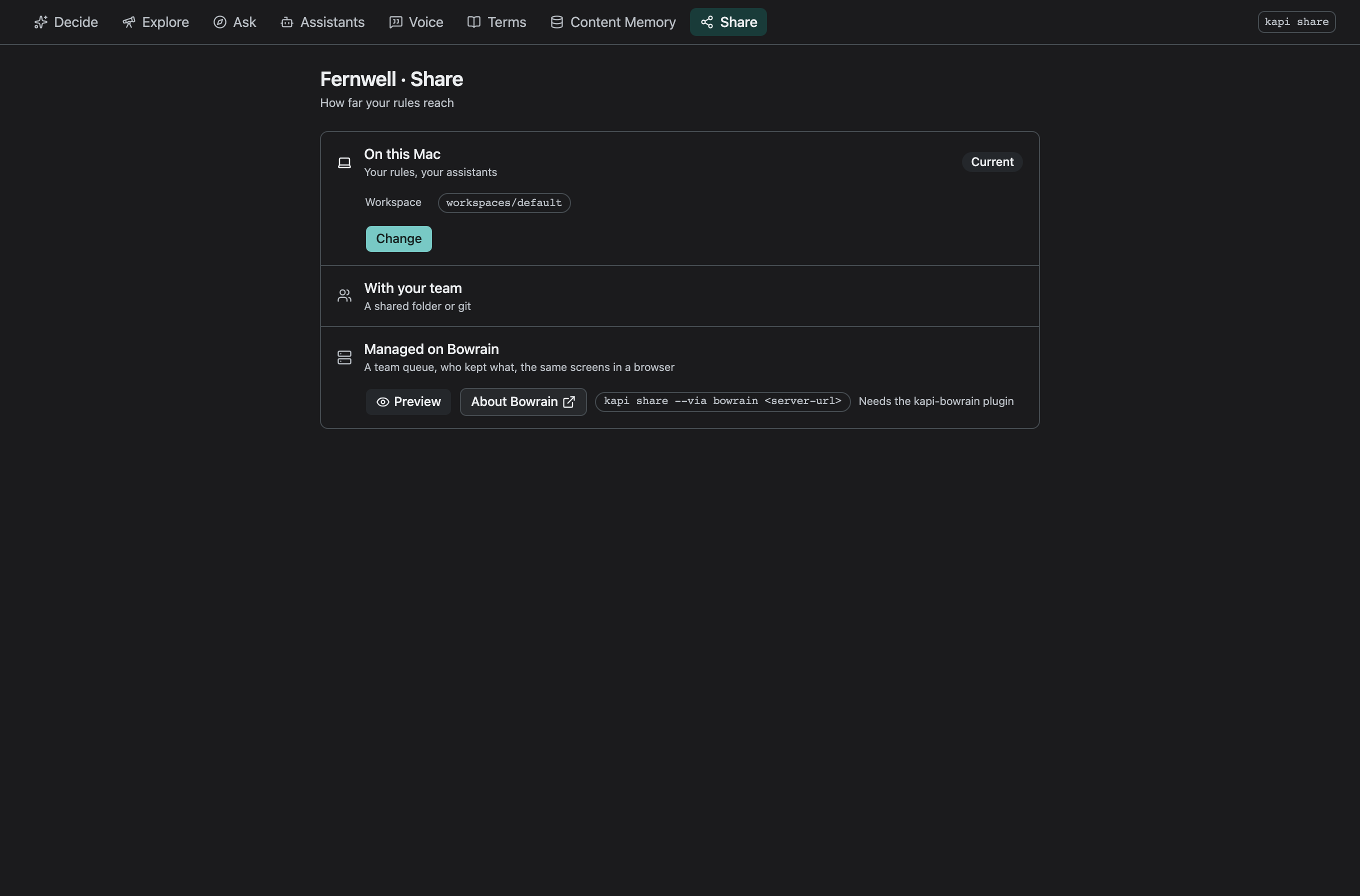
| Rung | What it adds |
|---|---|
| On this Mac | your rules, your assistants |
| With your team | a shared folder or git |
The third rung is a managed workspace; see A managed workspace. The rung the project stands on carries a Current badge. While On this Mac is current, it shows Workspace, your workspace folder by its last two segments, and Change. Hover over the folder for the full path.
Your workspace is one folder for your account on this machine, and it holds
the context of every project you work on. kapi joins a checkout to its
project by the id: in kapi.yaml, so a second clone, a worktree or a branch
of the same repository reads the same context. A rule you keep in one is in
force in all of them, with nothing to sync. Another machine, or another person,
reads none of it until you share it.
Choose a place to share it
Click Change under On this Mac. The dialog, Set up sharing, offers three places:
| Place | What it needs | Who can reach it |
|---|---|---|
| git | the project's own repository; kapi keeps the context in a ref outside every branch, refs/kapi/context on origin unless you name others | whoever can push a branch can push it |
| a folder | a path every machine mounts, such as a team share | whoever the filesystem lets in |
| S3 | a bucket, with a prefix, a region and an endpoint for an S3-compatible service | whoever your AWS credentials let in |
Credentials never go in the recipe. git uses the access you already have to the repository. S3 reads the standard AWS environment, shared configuration and profile on each machine.
Saving writes a context: block into kapi.yaml, for example:
context:
  backend: git
  ref: refs/kapi/context
In a folder you opened without a kapi.yaml, saving writes the recipe first,
the same draft kapi init writes, with the context: block in it. Commit the
recipe, so every checkout of the project names the same place.
Sync
Saving offers Sync now. A sync takes in what the rest of the team shared and merges it here, then shares what this machine recorded, then rewrites the project's rules files so the next assistant session reads what the team decided. The result appears under the rung, such as "Pulled 3, pushed 2, rules files written". Running it twice changes nothing, and two people who sync at once both succeed.
Once kapi.yaml names a place, With your team is current. The rung reads
the rules in force and when this machine last synced, such as "12 rules ·
synced 10:03", and under it says where the context is shared and how far apart
this machine and the shared copy were at the last sync:
| Fact | Example |
|---|---|
| Through | git, origin refs/kapi/context |
| To push | 2 |
| To pull | 0 |
Change opens the same dialog, to name another place. A teammate who pulls the recipe opens the project and clicks Sync now under the same rung. A fresh clone fetches branches and tags and leaves the context ref alone, so the first sync is what brings the context in.
When the place cannot be reached, the rung says "The place could not be reached." and shows the error the place returned. Nothing changes here: what this machine recorded waits, and the next sync shares it.
When the context: block in kapi.yaml cannot be read, for example after a
hand edit names a backend kapi does not have, On this Mac stays current.
It says "The place kapi.yaml names could not be read.", shows the recipe
check's words, and keeps Change, which saves a place that reads.
A managed workspace
The third rung is a managed workspace. It adds a team queue, a record of who
kept what, and the same screens in a browser. Until a project is connected,
the rung shows the command that connects it. A project reaches one through a
block of its recipe that is separate from the context: place, and the rung
then names the server and the workspace there. The note in the
tour says where to read more.
The same on the command line
kapi share does the same from a terminal:
| Command | What it does |
|---|---|
kapi share | prints the rungs with the current one marked, or syncs through the place kapi.yaml names |
kapi share --via git | keeps the context in a ref of the project's repository, then syncs |
kapi share --via folder <path> | keeps it in a folder every machine reaches, then syncs |
kapi share --via s3 s3://<bucket>/<prefix> | keeps it in an S3 bucket, then syncs |
kapi share --status | prints the rung and the last sync, without syncing |
--via writes the same context: block the dialog below saves, and writes a
kapi.yaml first in a folder that has none. An assistant or a CI job runs
kapi context sync, which syncs the same way; see
Sharing context for its flags.
Next
- Sharing context:
kapi context sync, its status line, and what travels with the context. - Connect an assistant: give each teammate's assistant the same rules.