Review what your assistant noticed
Goal: practise the loop you run after every assistant session, on a sample project where nothing you do touches your own work. You decide about what two assistants noticed in the KapiMart sample, see a kept rule reach the assistant, and go back to before a session.
The sample arrives with the notes already recorded, so no model runs and you need no assistant of your own. You need Kapi Desktop and nothing else. For what each surface is, see the overview.
Steps
- Open the sample. On the home, under Start here, click Try the sample. kapi creates KapiMart, reads its voice profile, terms and content memory into your workspace, and records two assistant sessions against its files: claude-code first, then codex.
- Read the news on the home. What's new has a row for KapiMart. It starts with the mark of the assistant that worked there last, CX for codex, and carries a chip for each kind of thing it noticed, such as "1 name" and "1 word". Because the two assistants disagree about one wording, the row adds a highlighted "1 needs you" chip and its button reads Decide.
- Open Decide. Click Decide. The project opens on KapiMart · Decide, with the number of suggestions to decide and the number of rules kept. The list holds one row per suggestion: its kind, the wording it is about, and how many forms or words it covers. The pane beside it asks one question about the row you select. The project's Map, first in the sidebar, lists the same suggestions under What your files do, and the Decide on each row opens this list with that row selected.

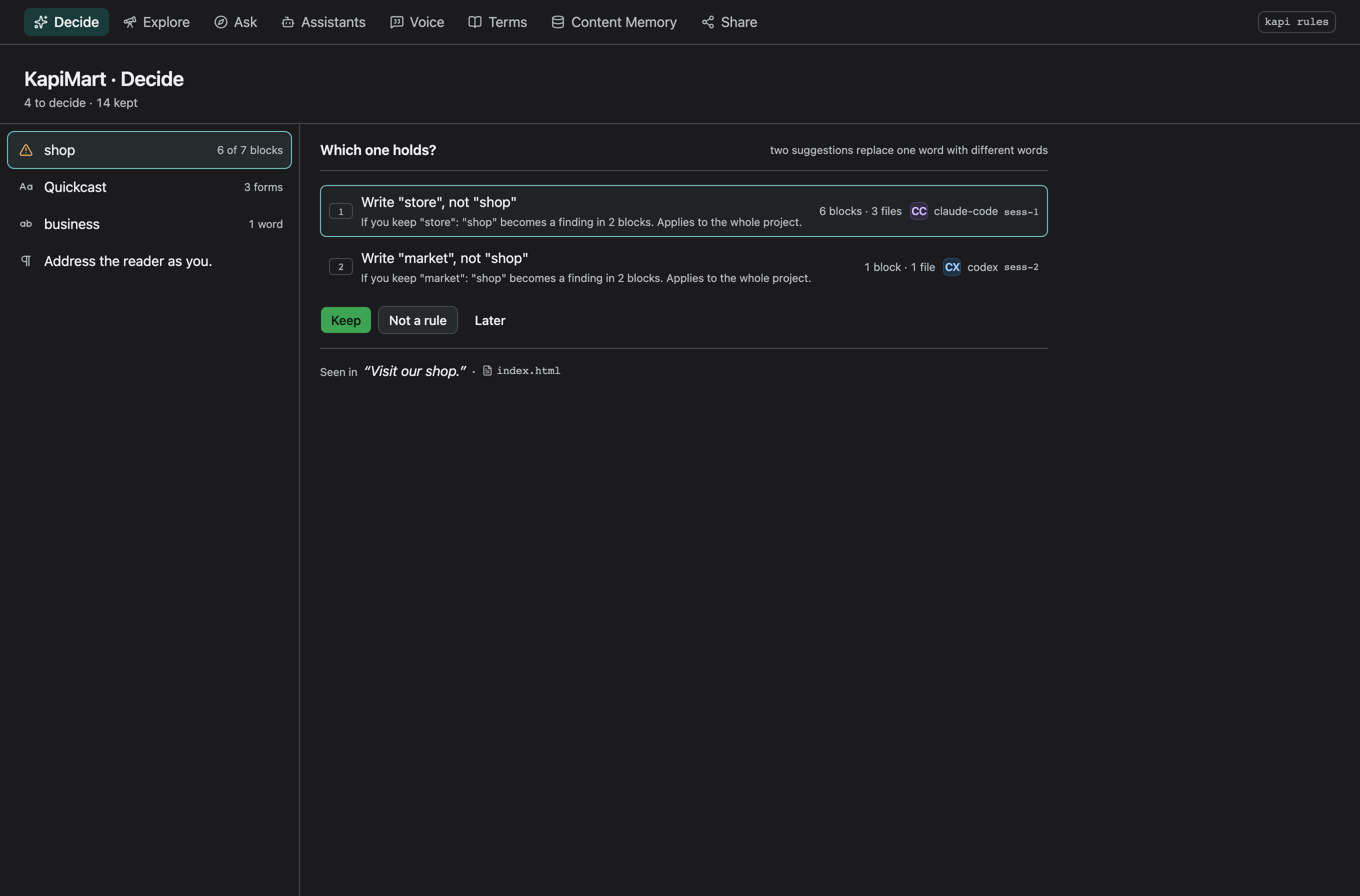
- Settle the disagreement first. The list opens on it. The question is
"Which one holds?", and the two sides are its options. claude-code recorded
a correction a person made to its draft, log in changed to sign in.
codex, later, recorded the opposite rule. Each side shows who suggested it,
how many blocks and files write it, and what keeping it does. Below the
actions, Seen in quotes the sentence and names the file. Pick the side
the evidence backs with a click or its number, then click Keep or press
k. That side is kept, the other is set aside, and the next question is selected. - Keep a name in the form your files use. Select KapiMart. The question
is "Which one do your files use?", and the options are its forms, the most
used first, each with its blocks and files. The line above the actions says
what keeping the picked form does: how many blocks then report a finding,
and where the rule applies. Press
k. To keep a form that is not listed, choose Other…, type the form, and press Enter. - Keep a word. Select basket. The question is "Keep this as a rule?",
and the line above the actions says what a check reports once you keep it.
Press
k. - Mark one as not a rule. Select the note about how the store copy
addresses the shopper and press
n, or click Not a rule. It stops advising at once. - Leave one for later. Select PayPal and press
l, or click Later. kapi records nothing: the suggestion keeps advising, and Decide asks about it again the next time you open it. - Ask about the file the evidence came from. Select any remaining suggestion and click the file under Seen in. Ask opens standing at that file, with the voice and the rules that apply there.
- See what the assistant reads. Open Assistants and click Show
what it reads. Under The brief for a file, pick one of the store's pages. The kept name and the kept
word are in the list of words to use, the same text
kapi context <path>prints. Below it, Rules files shows the section kapi writes intoAGENTS.mdandCLAUDE.md, which the next session reads as it starts. - Go back to before a session. Open Assistants and select the codex session under Sessions. Click Reset to before this session above its operations. What codex recorded is set aside, and so is everything decided after it started, which includes your decisions in steps 4 to 7. Decide asks about claude-code's suggestions as they first arrived.
- Take the reset back. What the reset set aside stays in Sessions, marked as set aside, and the reset is recorded as yours, in the newest row of the list. Select that row and click Take this reset back to bring everything back.
A check reports a suggestion and fails nothing. After step 5, kapi check
fails on any page that writes Kapi Mart, because the suggestion became a
rule.
The same on the command line
kapi rules                                  # one question per suggestion: k, n, l
kapi rules --keep <id>                      # keep a suggestion
kapi rules --keep <id> --use "Kapi Mart"    # keep a name in another form
kapi rules --drop <id>                      # not a rule
kapi rules --later <id>                     # leave it waiting
kapi rules --choose <id>                    # keep one side of a disagreement
kapi context reset --before <session>       # go back to before a session
Growing context covers every decision and who may make it.
Next
- Connect an assistant: put your own assistant on a project, so it records what it notices.
- Share context with your team: let every machine read the rules you kept.