Your first project
At the end of this page, one word is spelled one way across a folder of documents, and every edit is checked against that rule. The rule is kept once, and Kapi Desktop, your assistant and the CLI all enforce it.
A project is a committed recipe (kapi.yaml) that says which files count as
content, plus the wiring that lets the coding agents in your repository reach
kapi. Your first project has one language. You open the folder, see what kapi
finds, decide what becomes a rule, check and fix the files, put an assistant on
the project and share the rules. Languages are a later step.
The examples come from acme-docs, a git repository with a README.md and
five Markdown files under docs/. Two of its blocks use e-mail where the
others use email.
1. Open the folder
- Desktop
- Agent (Claude)
- CLI
Install Kapi Desktop and open it. Click Choose a folder, or drop the folder on the window. To look around first, Try with KapiMart opens a sample project with rules, terms and an assistant's notes to decide about.
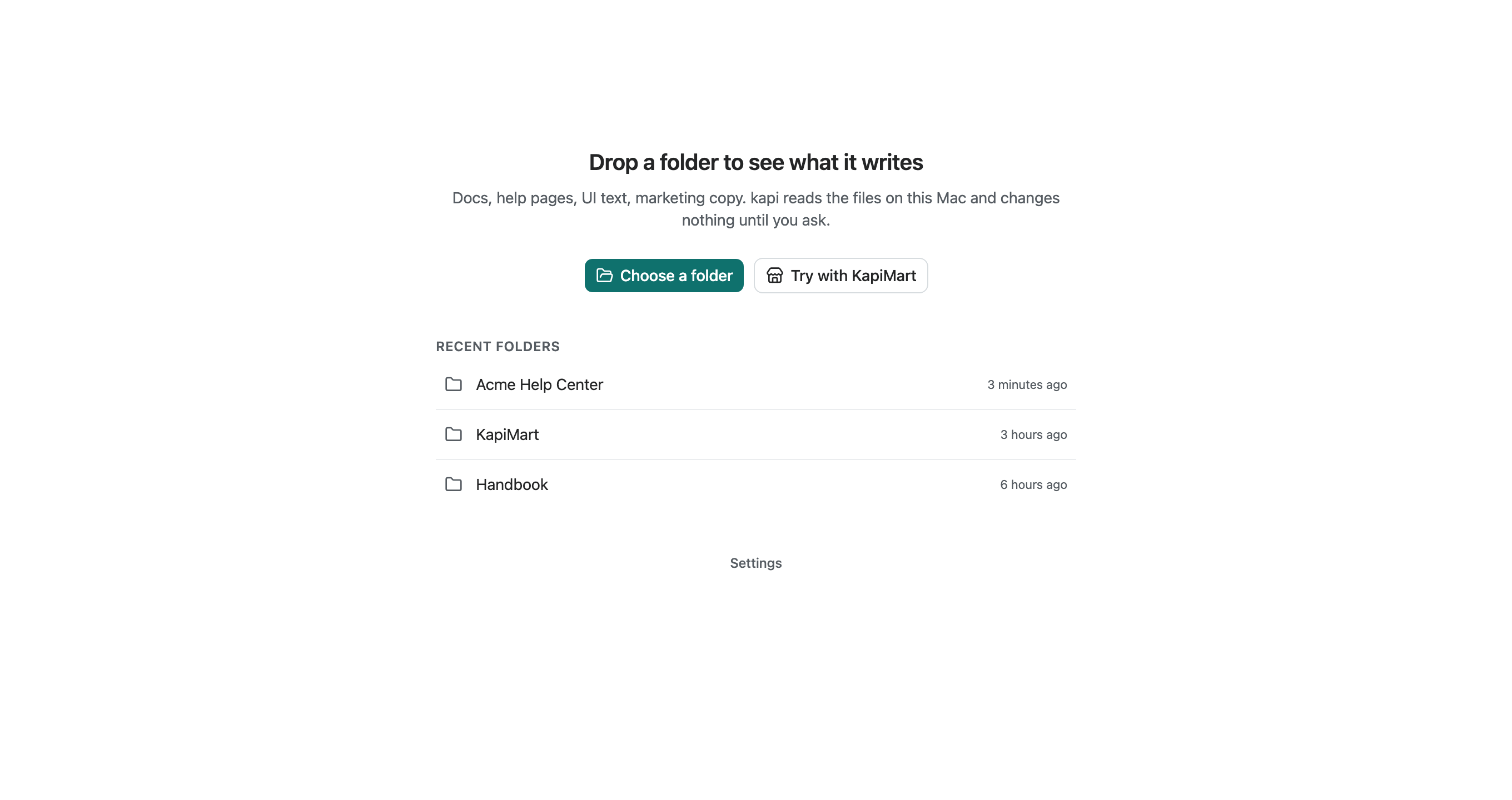
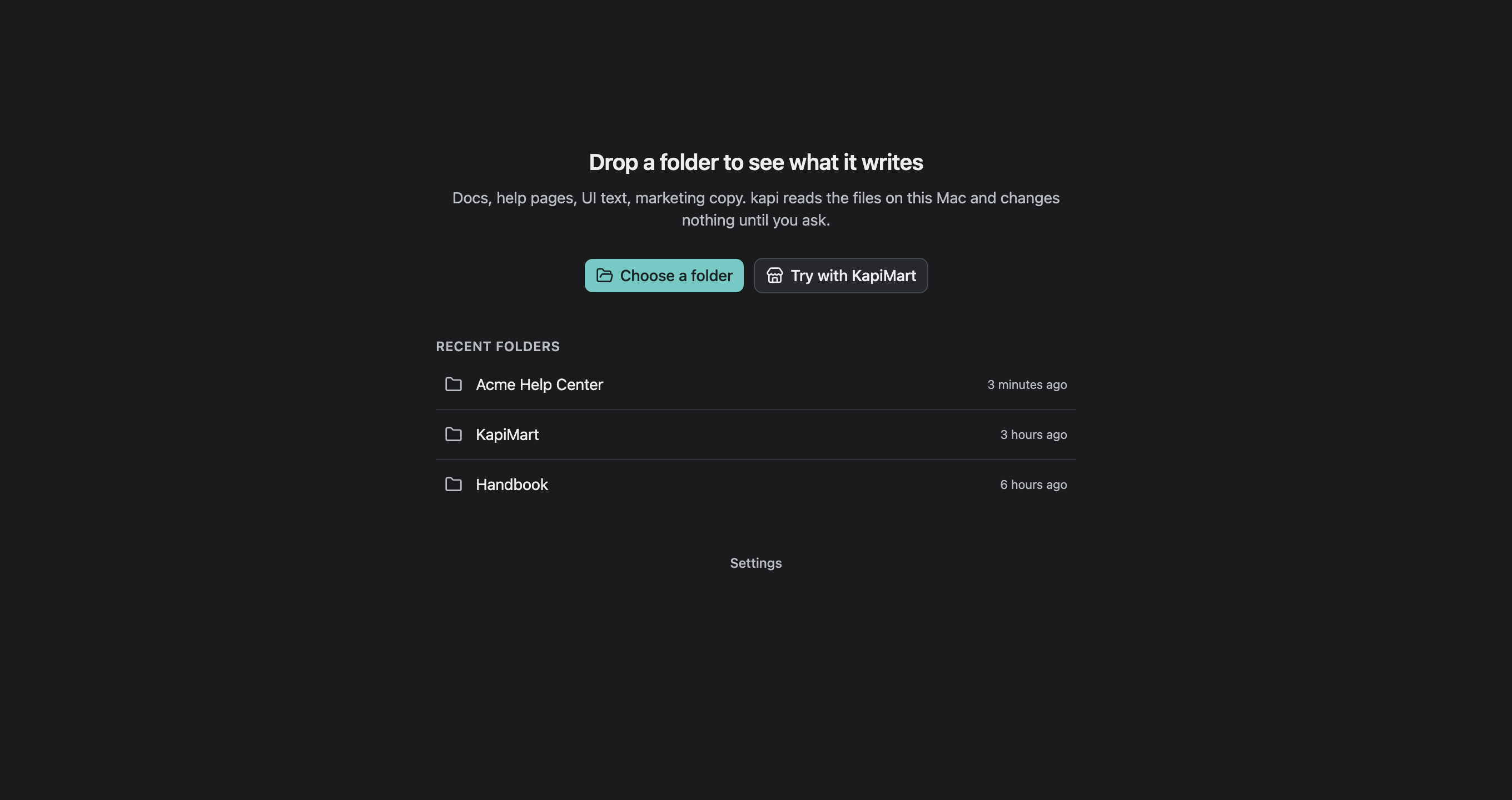
Kapi Desktop reads the files and changes nothing until you ask. The project
opens on its Overview, the desktop form of kapi look. From there:
- What your files do lists the suggestions, and Decide asks about each one with Keep, Not a rule or Later.
- A row under Files opens the file in the Reader, with each finding in place, the rules in the margin and Fix where kapi can fix a finding.
- The project's Project Settings hold the Assistants tab, which connects an assistant, and the Share tab.
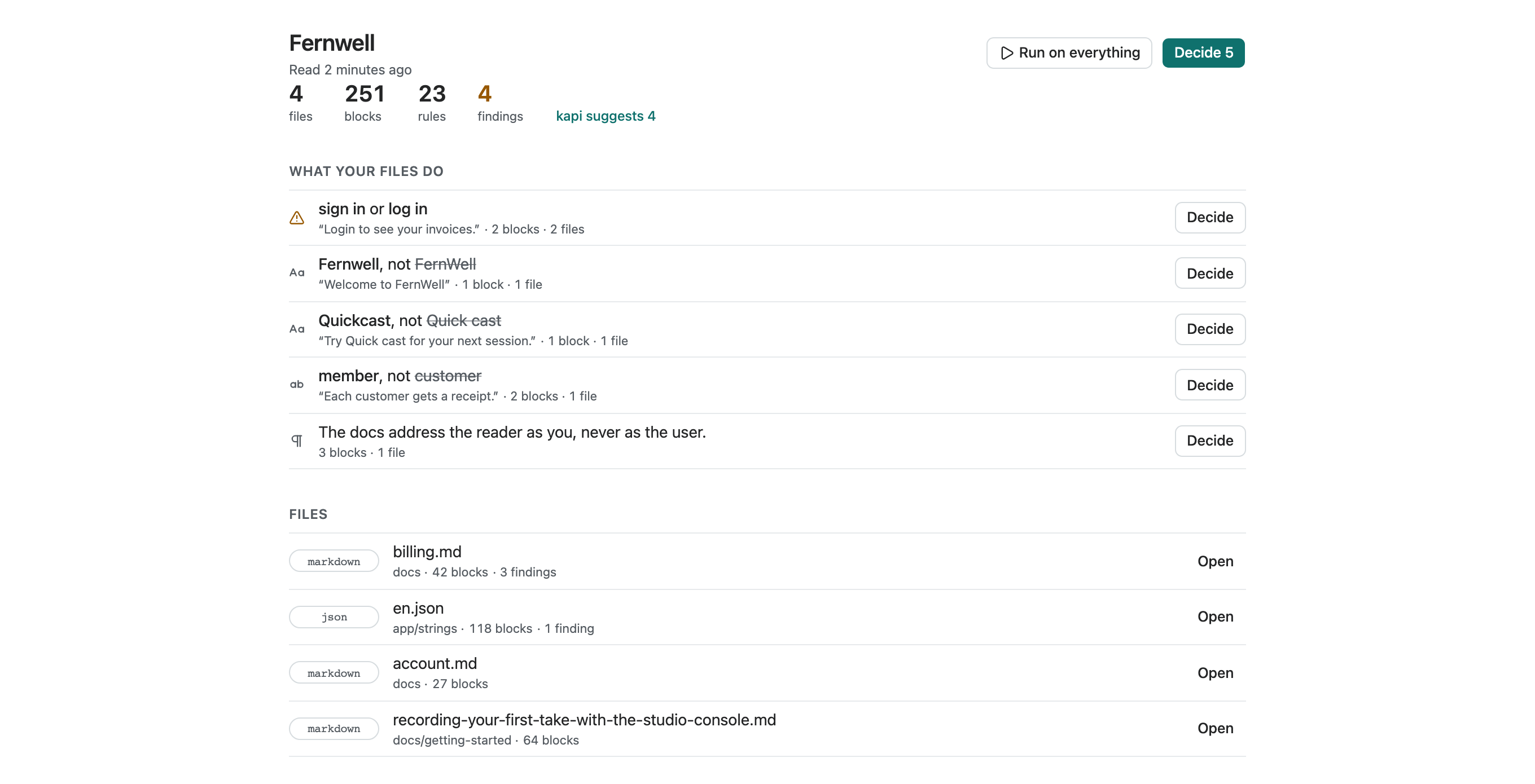
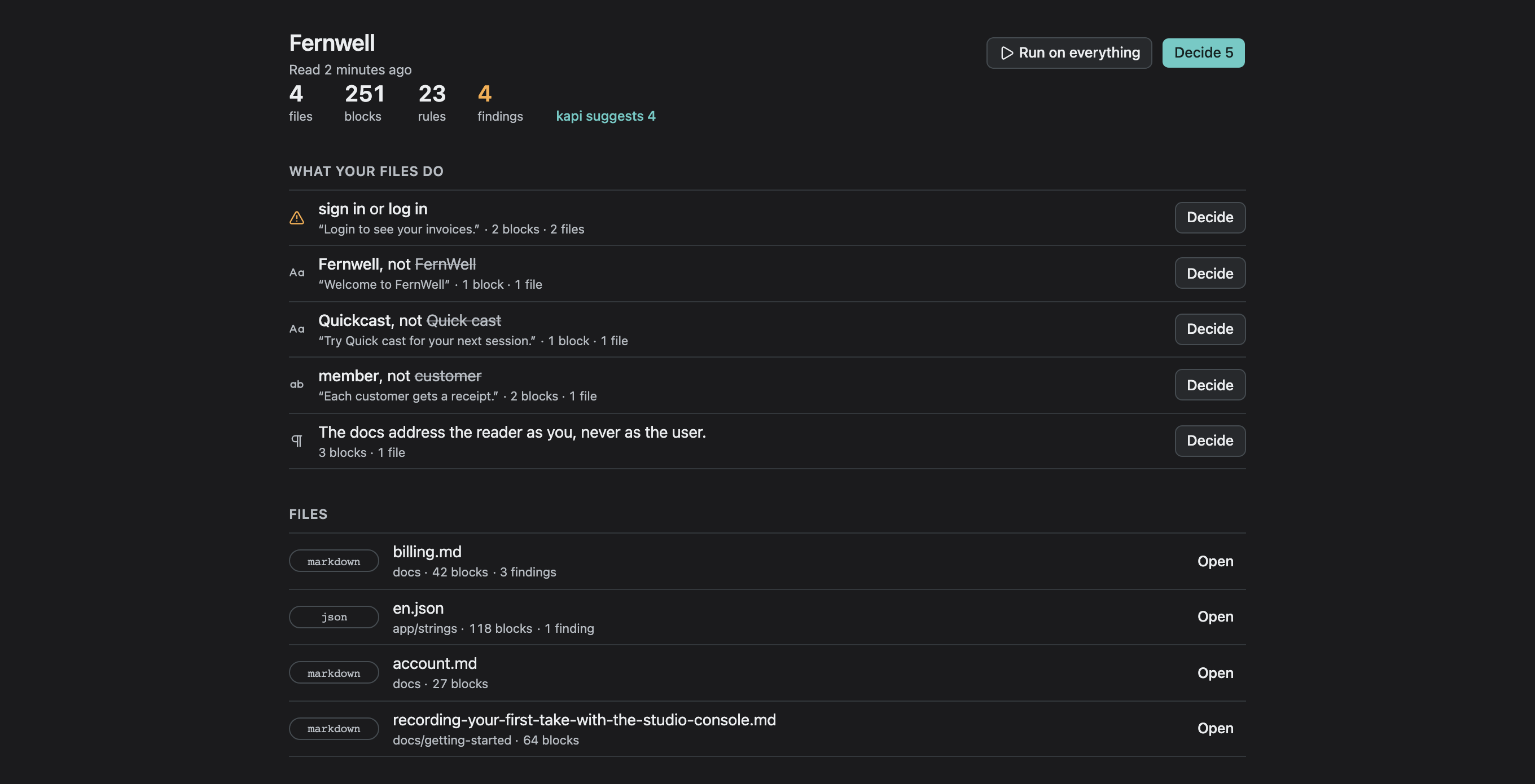
Review what your assistant noticed walks through Decide on the sample.
Creating a project from the New Project dialog, opening the KapiMart sample, adding a content collection, and reading the two-axis standing and where content sits.
With the Kapi skill or MCP server connected, ask for the project:
Set kapi up for this project.
Claude runs kapi init and presents the proposed content collections for your
review. Commit the generated recipe and agent configuration. Step 3, deciding
what becomes a rule, is yours, in a terminal or in Kapi Desktop.
Install the CLI, then from the folder:
$ kapi init
Initialized kapi project "acme-docs"
  recipe: /path/to/acme-docs/kapi.yaml
  collections (proposed from the files here; edit the recipe to change them):
    README.md     markdown, 1 file
    docs/**/*.md  markdown, 5 files
  mcp:    .mcp.json (created: kapi mcp --project kapi.yaml)
  skill:  .claude/skills/kapi (created: 1 file)
  rules:  AGENTS.md (created)
  rules:  CLAUDE.md (created)
kapi init reads the files in the folder, honouring .gitignore and skipping
dependency and build directories. The collections are the files kapi reads as
content: documents grouped by directory, a file at the root on its own, and
i18n catalogs where a known framework layout or a file named for the source
language marks them. kapi add "<pattern>" adds another. Running kapi init
again leaves them as they are and prints any content no collection reads yet.
For a known stack, kapi init --preset react-i18next (or nextjs,
vue-i18n, …) writes its catalog layout before the files exist;
kapi init --list-presets lists them.
The last four lines connect Claude Code; step 6 says what they are.
The recipe is plain YAML:
version: v1
# This project's stable identity. It survives a rename, a move and a clone,
# and everything kapi records about the project is keyed on it. Keep it.
id: prj_fyvo35str3o4bv3aty766bj6w4
name: acme-docs
defaults:
  source_language: en

# Collections are the files kapi reads as content. kapi init proposed these
# from the files it found. Edit them freely; 'kapi add <pattern>' adds more.
collections:
  # README.md: Markdown, at the root
  - path: README.md
    format: markdown
  # docs/: 5 Markdown files
  - path: "docs/**/*.md"
    format: markdown
id: joins every checkout, worktree and clone of the repository to one
context, so keep it. Commit the recipe and the agent configuration. kapi init
excludes .kapi/ from version control: it holds derived stores and caches,
personal reader filters, and any redaction vault, whose withheld originals are
lost if you delete it. See The project store and the
project file reference.
Every kapi command run anywhere in the tree finds the project by walking up, like git.
2. See what applies
kapi look, or kapi on its own, prints the project as kapi reads it:
$ kapi look
acme-docs · read 6 files just now

  6 files · 18 blocks · 0 rules · 2 findings · kapi suggests 1

What your files do
  Name  email, not e-mail, e mail  5 of 7 uses

Files
  docs/guide.md          5 blocks · 2 findings
  docs/faq.md            3 blocks
  docs/installation.md   3 blocks
  docs/reference/api.md  3 blocks
  docs/release-notes.md  2 blocks
  README.md              2 blocks

Decide with `kapi rules`. See a file with `kapi look <path>`.
A new project has no rules, so the first look records what kapi sees in the
files as suggestions. It uses no model for this. Here the files write email five times
and e-mail twice. The two findings are the uses of e-mail, reported against
the suggestion and failing nothing. kapi look docs/guide.md prints that
file's blocks with each finding marked under the words it is about. In Kapi
Desktop, the project's Overview shows the same view.
3. Decide what becomes a rule
kapi rules asks about each suggestion, with the evidence and what keeping it
does. In Kapi Desktop, Decide asks the same questions:
$ kapi rules
[1/1] Which one do your files use?  #0rbnyk4bjm
  * 1) email  5 blocks in 4 files
    2) e-mail  2 blocks in 1 file
    3) e mail  0 blocks in 0 files
    4) Other…
  If you keep "email": the other 2 forms become findings in 2 blocks. Applies to the whole project.
  Seen "Create a workspace, then invite your team by e-mail address." in docs/guide.md

Decide with: kapi rules --keep <id>, --drop <id> or --later <id>
In a terminal it waits for your answer: k keeps the marked form, a number
picks another, n says it is not a rule, and l leaves it for later. A
suggestion left for later keeps advising. Outside a terminal it lists the
questions, and you decide by id with kapi rules --keep 0rbnyk4bjm.
A kept suggestion becomes a rule in the project's terms store, beside the
evidence it rested on. kapi rewrites its section of CLAUDE.md and
AGENTS.md, so the next agent session reads the rule there:
Say this, not that:
- email, not "e mail" or "e-mail"
--advisory keeps a rule that reports and never fails. kapi rules list
lists what the project keeps, and kapi rules drop <id> sets a rule aside.
Only a person keeps or drops a suggestion; see
Growing context.
4. Check
Before you kept it, the suggestion only reported and kapi check passed. Now
it fails on each use of e-mail:
$ kapi check docs/guide.md
  outcome  rule              location                                      message
  FAILS    terms.vocabulary  docs/guide.md:getting-started/next-steps/p#2  Forbidden term "e-mail" found
                                                                           ↳ Use "email" instead
  FAILS    terms.vocabulary  docs/guide.md:getting-started/p               Forbidden term "e-mail" found
                                                                           ↳ Use "email" instead

FAIL configured checks: 2 failing, 0 reported · score 50/100
  Coverage: 2 analyzer runs completed.
  Context: docs/guide.md; voice none (project); terms loaded
Error: quality gate failed
The Context: line names the voice profile that applies and whether terms were
loaded. kapi check with no path checks the whole project, and
kapi check --ship enforces the release policy. Both exit 3 when a finding
fails, so you can run the check as a CI step: see
Ship gates & CI.
5. Fix
kapi fix applies the replacement each failing word-rule finding names, then
checks the files it wrote again:
$ kapi fix
2 fixed in 1 file
  docs/guide.md  2 fixed: e-mail → email, e-mail → email
kapi check: no failing findings
Every byte outside the replaced words stays as it was. In Kapi Desktop, Fix
on a finding in the Reader applies the same replacement. kapi fix --dry-run
prints the change each file would get and writes nothing. A finding about tone
or style, or one over words that hold a link or a placeholder, has no automatic
fix, and kapi fix lists it as needing a rewrite.
6. Put an assistant on it
kapi connect writes what an assistant needs to follow the rules: the rules
section in AGENTS.md and CLAUDE.md, an MCP server entry that starts
kapi mcp for this project, and the kapi skill. kapi init already did this
for Claude Code, so here every file is kept:
$ kapi connect
Claude Code   connected · rules, MCP server, skill
  .mcp.json            kept
  .claude/skills/kapi  kept
  Edit hook            pending: in Claude Code, /plugin marketplace add neokapi/claude-plugins, then /plugin install kapi@neokapi-plugins
  Stop hook            pending: in Claude Code, /plugin marketplace add neokapi/claude-plugins, then /plugin install kapi@neokapi-plugins
Cursor        not connected: no .cursor/ folder here (kapi connect cursor adds it)
VS Code       not connected: no .vscode/ folder here (kapi connect vscode adds it)
Codex         not connected: no .codex/ folder here (kapi connect codex adds it)

Project
  kapi.yaml            kept
  AGENTS.md            kept
  CLAUDE.md            kept

See what an assistant reads for a file: kapi context <path> --explain
Then give the assistant an ordinary writing task. It reads the rules as it
starts, asks kapi context <path> before it writes a file the rules section
does not cover, and runs kapi check on each file it changed. Claude Code asks
you to approve the project MCP server the first time, so review .mcp.json the
way you would any file a repository ships.
While it works, the assistant notes what the files keep to and the wording you
change in its drafts. Each note arrives as a suggestion in kapi rules, and
step 3 decides it. See Use with Claude.
7. Share the rules
The rules live in your workspace on this machine, keyed on the project's
id:, so every checkout here reads the same ones. kapi share shares them
with the people who work on the project. In a repository with a remote,
--via git keeps them in a ref outside every branch:
$ kapi share --via git
kapi.yaml  updated
With your team · through git (origin refs/kapi/context)
  pushed 6 changes · pulled none · last sync just now
Commit the change to kapi.yaml so every checkout shares through the same
place. After that, kapi share on its own reads what the others shared and
shares what was kept here. See Sharing context.
Later: add languages
When the project needs a target language, add it to the recipe and run
kapi up. See Add languages.
Next
- Growing context: noting, deciding, and going back to before an agent's session.
- Projects: the concept; ad-hoc vs project, the recipe, the store.
- Set up your brand guide in 10 minutes: writing a voice profile by hand, when you want one.